Demo
Had free Modal credits from a hackathon and wanted to build something in the “coding agents in sandbox” space so i plugged @modal sandboxes with @opencode headless server, added Git for version checkpoints and @Netlify for deploys and built what i call “Buildman - Yet Another AI App Builder”
— Varun Khalate (@varunhnk) 2026
Features
- Live preview renders your app in an iframe and updates as the agent edits files
- Chat to iterate lets you refine the app with follow-up prompts in plain English
- Prompt queue accepts new requests while the agent is still working and runs them in order
- Version history creates a git checkpoint after every completed task so you can jump back to any point or stop a run mid-execution
- One-click deploy publishes to a live Netlify URL; each project gets its own dedicated site
- Starter template gives every project a production-ready React + Vite + Tailwind base baked into the sandbox image
Architecture
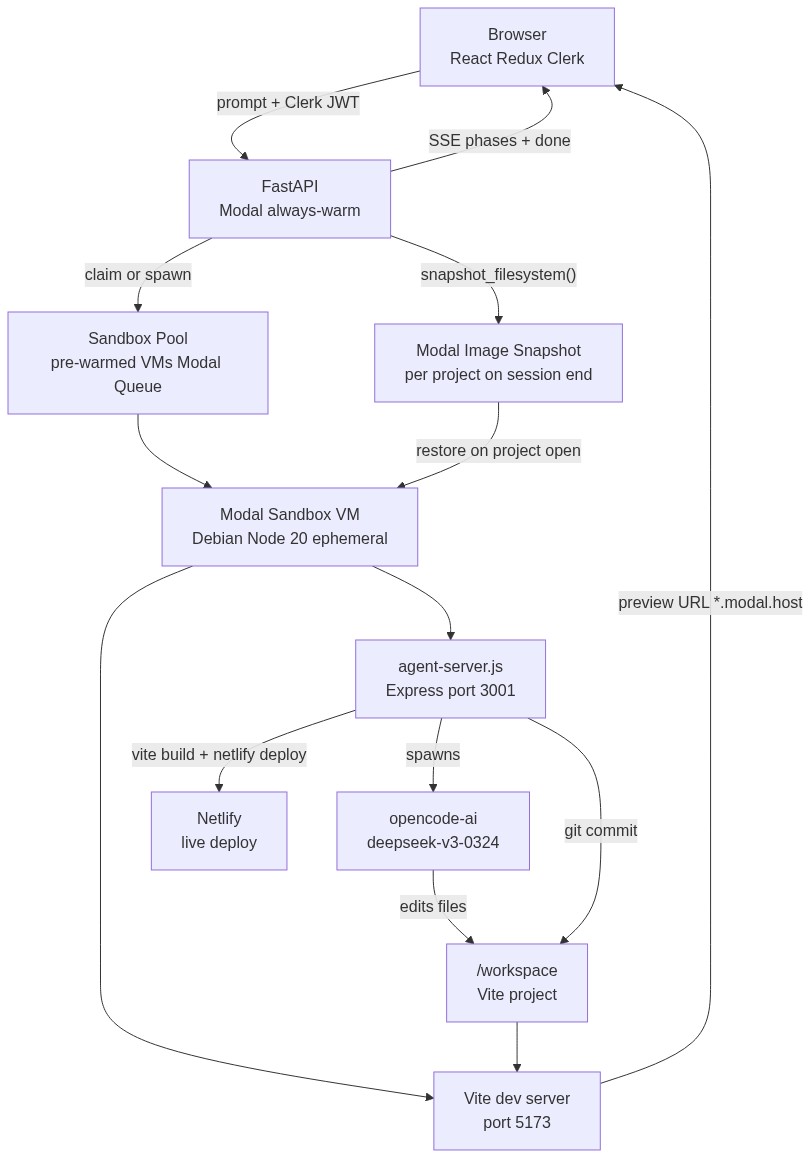
The browser sends prompts with a Clerk JWT to a Modal-hosted FastAPI backend. FastAPI claims a pre-warmed sandbox from the pool, forwards the prompt to agent-server.js inside the VM, and streams SSE progress back. The agent drives opencode-ai to edit files in /workspace; Vite picks up the changes and serves a live preview via a Modal-tunnelled URL that renders directly in the browser iframe. On session end, FastAPI snapshots the full VM filesystem so the project can be restored exactly on next open.
The Sandbox
Each user gets their own ephemeral Debian slim container with Node 20, opencode-ai, and Netlify CLI pre-installed. Two ports are tunnelled via Modal’s encrypted URLs and exposed to the browser:
| Port | Process | Role |
|---|---|---|
| 3001 | agent-server.js (Express) | Control plane that receives prompts, drives the coding agent, and handles git checkpoints and deploys |
| 5173 | Vite dev server | Live preview that hot-reloads as the agent edits files |
Directory layout inside the VM:
/app/                       # agent-server.js + its node_modules
/opt/starter/               # starter template (read-only, source of truth)
/workspace/                 # live project — agent edits files here
    ├── src/
    ├── package.json
    └── node_modules/       # pre-installed at image build time
Lifecycle:
- On first use,
/opt/starteris copied into/workspaceand the Vite dev server starts - On project reopen, the VM is restored from a Modal filesystem snapshot (
snapshot_filesystem()) - After 15 minutes of inactivity, the sandbox is terminated and released back to the pool
- A warm pool of 2 pre-warmed VMs is maintained via a Modal Queue and a scheduled function that tops it up every 5 minutes, so new projects start with zero cold starts
Starter Template
Every project begins from the same minimal React template baked into the sandbox image. The agent edits files in place and never scaffolds from scratch.
/workspace/
├── index.html
├── vite.config.ts          # @ → src/ alias, port 5173
├── package.json
└── src/
    ├── App.tsx             # top-level shell
    ├── main.tsx            # entry point + error boundary
    ├── index.css           # design token system
    └── lib/utils.ts        # cn() utility
Pre-installed packages:
| Package | Purpose |
|---|---|
react 19 + react-dom | Core |
tailwindcss v4 | Styling |
lucide-react | Icons |
clsx + tailwind-merge | Conditional classes via cn() |
Design system (Deep Amber) is a monochromatic light-first token set built on a single warm hue (oklch H=65). Background, cards, borders, muted text, and primary all share the same hue at different lightness levels. The agent is instructed to use only these tokens and never reach for raw hex values or arbitrary Tailwind palette utilities, so every generated app looks cohesive without extra prompting.
Stack
| Layer | Tech |
|---|---|
| Frontend | React 19, Redux Toolkit, Tailwind CSS v4, Clerk |
| Backend | FastAPI, Python 3.12, Modal |
| Sandbox | Debian slim, Node 20, opencode-ai, Netlify CLI |
| Starter template | React 19 + Vite 6 + Tailwind CSS v4 + lucide-react |
| Auth | Clerk (JWT validated server-side via JWKS) |
| Persistence | Modal image snapshots (snapshot_filesystem) |
| Deploy target | Netlify (one site per project) |
Technical Highlights
- A warm pool of pre-warmed VMs sits in a Modal Queue at all times. New projects claim from the pool instantly while a scheduled function continuously refills it, eliminating cold starts entirely.
- The starter template acts as a taste-setter for the agent’s output. The design token system and pre-wired component structure set the quality floor for everything the agent generates, so the output looks polished without extra prompting.
- Agent rules make a significant difference in reliability. Explicit instructions passed to opencode-ai (no raw hex, no arbitrary utilities, always use
cn(), etc.) reduce build and compilation errors compared to letting the agent decide styling conventions on its own.